 sales@webguruz.in
 +1 (213) 715-5368
Vedanshi
2026-10-09
7 min read
How to Use HubSpot AI Agents to Automate Sales, Marketing, and Customer Support
A sales team spends hours researching prospects. Marketing repeats the same tasks across campaigns.
Read More
Published On:2026-02-02
Managing social media goes far beyond publishing posts. While creating content is important, the real value lies in understanding how that content performs and how it contributes to business growth. HubSpot Marketing Hub makes social media analysis more structured by combining analytics, automation, and AI-powered insights into one platform.
Instead of relying on surface-level engagement metrics, businesses can use HubSpot Marketing Hub to track performance patterns, identify trends, and make informed decisions based on real data. This guide explains how to analyze social media performance effectively using the platform and how AI-enhanced reporting helps improve accuracy over time.
Social media analytics reveal what type of content resonates with your audience, which platforms drive meaningful engagement, and when users are most likely to interact. Without clear insights, it’s difficult to refine your strategy or justify continued investment in social media marketing.
With Marketing Hub, social media data is centralized and enhanced with intelligent analysis. Instead of manually comparing reports across tools, marketers can rely on AI-assisted insights to surface trends, highlight performance gaps, and support long-term optimization.
To begin analyzing performance, you’ll need to connect your social media accounts within HubSpot Hubs. Once logged in, navigate to the Marketing Hub and select “Social” from the main menu. The platform supports Facebook, Instagram, LinkedIn, and Twitter (X), covering most business use cases.
After authentication, Marketing Hub begins collecting data immediately. As engagement data accumulates, the platform applies AI-driven analysis to improve reporting accuracy and trend identification. While historical data availability depends on each platform’s API, future data is stored continuously for ongoing analysis.
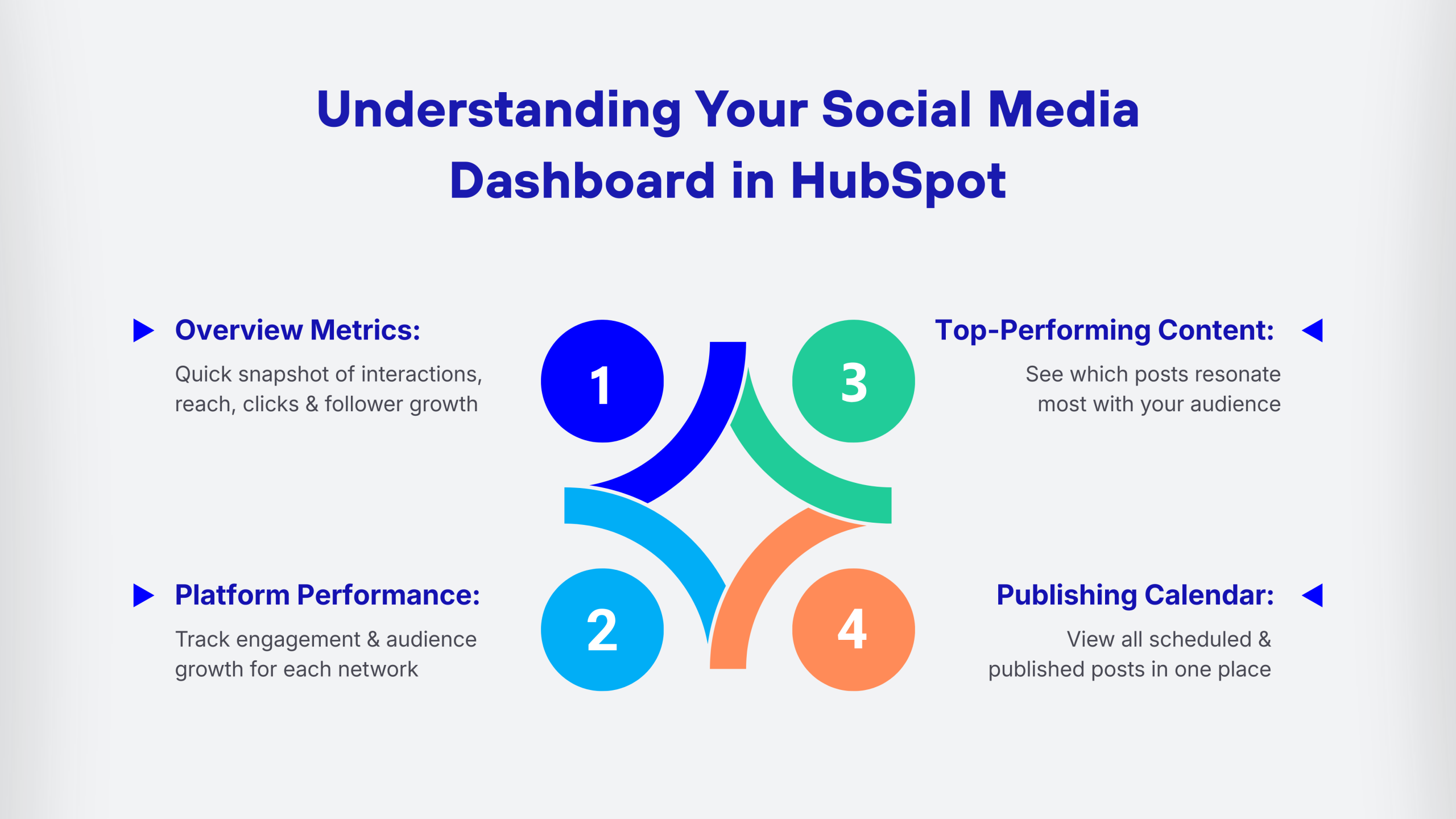
The social media dashboard is your command center. Here’s what you’ll find:
This section displays high-level metrics such as total interactions, clicks, reach, and follower growth. AI-assisted summaries help identify performance changes without requiring deep manual analysis.
Scroll down to view platform-specific metrics. Each social network has its own section showing posts, engagement rates, and audience growth.
The platform automatically highlights posts with the strongest performance based on engagement and interaction trends. This helps teams identify content patterns that consistently deliver results.
See all your scheduled and published posts in one place, making it easy to spot gaps or overlaps in your content strategy.
Not all metrics are created equal. Here are the ones that actually matter for most businesses:
Shows how users interact with content. AI-assisted trend analysis helps identify which content formats and topics perform best over time.
If you’re sharing links, this metric tells you how many people are curious enough to click through to your website or landing pages.
Track how your audience size changes over time. Sudden drops or spikes can indicate what’s working or what might need adjustment.
Reach shows unique viewers, while impressions count total views. The difference helps you understand content visibility.
HubSpot analyzes engagement patterns to recommend optimal publishing times, reducing guesswork in scheduling.
One of the best features of HubSpot Marketing Hub is the ability to build custom reports that match your specific business goals. Here’s how to do it:
Go to “Reports” in the main navigation, then select “Create custom report.” Choose “Social Media” as your primary source. From here, you can mix and match metrics that matter most to you. Want to track Instagram Stories separately from feed posts? You can do that. Need to compare LinkedIn performance month-over-month? Easy.
Save your custom reports to your dashboard for quick access. This is especially helpful if you’re preparing regular performance updates for stakeholders or clients.
Here’s where things get really interesting. HubSpot doesn’t just show you social media metrics in isolation; it connects them to actual business outcomes.
Using the attribution reporting features, you can trace social media interactions all the way through to conversions, sales, and revenue. This integration works seamlessly with HubSpot Sales Hub, allowing you to see which social campaigns are actually bringing in qualified leads.
AI-supported attribution helps identify which social channels influence conversions across multiple touchpoints, offering a clearer picture than basic last-click models.
Want to know how you stack up against competitors? The platform includes competitor tracking tools that let you monitor other businesses’ social media performance. Add competitor profiles to your dashboard and compare metrics like follower growth, posting frequency, and engagement rates.
This isn’t about copying what others do; it’s about understanding the landscape and finding opportunities to stand out.
Now that you’re collecting all this data, what do you do with it? Start by looking for patterns. Which content types consistently perform well? What topics generate the most conversation? When is your audience most active?
Use these insights to refine your content calendar. Double down on what works and experiment with new approaches for what doesn’t. The beauty of HubSpot Content Hub integration means you can align your social strategy with your broader content marketing efforts, creating a cohesive approach across all channels.
Understanding return on investment is critical for justifying your social media budget. While the HubSpot ROI Calculator can help with broader marketing calculations, you can also calculate social-specific ROI within Marketing Hub.
Track the cost of your social media efforts (time, ads, content creation) against the revenue generated from social-attributed customers. This gives you a clear picture of what your social presence is actually worth to your business.
For active campaigns, check weekly to catch trends early. For general monitoring, a monthly deep dive is usually sufficient. The key is consistency; pick a schedule and stick with it.
Yes, you can track paid campaigns from Facebook and LinkedIn directly within the platform. Connect your ad accounts the same way you connected your organic profiles.
Marketing Hub focuses on publishing, analytics, and campaign management. Content Hub is designed for creating and managing content across all channels, including blog posts and website pages that you might share on social media.
Once connected, HubSpot stores all your social data going forward indefinitely. However, initial historical data is limited by each platform’s API, typically 30 days to a few months.
Absolutely. HubSpot supports team collaboration with different permission levels, so you can control who can view reports, publish content, or modify settings.

Vedanshi
2026-10-09
7 min read
A sales team spends hours researching prospects. Marketing repeats the same tasks across campaigns.
Read More
Vedanshi
2026-10-07
7 min read
HubSpot UNBOUND 2026 sent a clear message to businesses: growth is becoming more connected.
Read More
Vedanshi
2026-10-07
7 min read
For years, ranking on Google’s first page was one of the clearest goals in search marketing. But search is no longer limited to a list of blue links.
Read More