 sales@webguruz.in
 +1 (213) 715-5368
Vedanshi
2026-10-23
7 min read
Custom HubSpot Integrations: Benefits, Examples, and Best Practices
Your business uses HubSpot to manage customer relationships, but disconnected systems create data issues.
Read More
Published On:2026-06-24
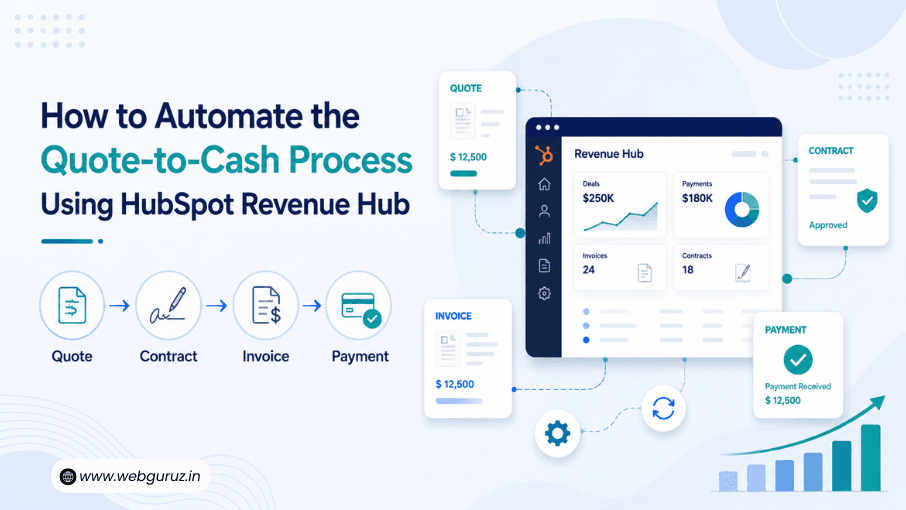
Closing a sale is exciting, but it’s only part of the journey. Once a customer decides to buy, there’s still plenty to do: prepare a quote, get approvals, sign contracts, send invoices, collect payments, and sometimes manage an ongoing subscription. When these tasks are handled through emails, spreadsheets, or multiple disconnected tools, things can quickly become messy.
That’s why businesses are paying more attention to HubSpot Quote-to-Cash automation. Instead of treating each step as a separate process, HubSpot Revenue Hub brings everything together in one place, making it easier for sales and finance teams to work together and keep deals moving.
This shift isn’t just about convenience. According to McKinsey’s State of AI report, 78% of organizations now use AI in at least one business function. For AI and automation to deliver meaningful results, businesses need clean, connected data, and that starts with having their revenue processes under one roof.
In this guide, we’ll break down what quote-to-cash means, why manual processes slow businesses down, and how HubSpot Revenue Hub can help streamline the entire experience.
Quote-to-Cash, often shortened to Q2C, is the process that begins when a customer requests a quote and ends when the business receives payment.
Think of it as the complete path from “I’m interested” to “Payment received.”
A typical quote-to-cash journey includes:
When these steps are connected, teams spend less time on admin work and more time building customer relationships.
| Stage | Without Automation | With HubSpot Revenue Hub |
|---|---|---|
| Quote Creation | Manual documents and emails | Create and manage quotes in one place |
| Contract Approval | Long email chains | Digital workflows and approvals |
| E-Signatures | Third-party tools | Connected signing experience |
| Invoicing | Separate accounting software | Integrated with customer records |
| Payments | Multiple systems | Centralized payment tracking |
| Subscriptions | Manual follow-ups | Easier recurring revenue management |
| Reporting | Data from different platforms | Unified revenue insights |
The goal isn’t just to speed things up, it’s to make the entire customer experience smoother while giving your team better visibility into every deal.

Many businesses still rely on spreadsheets, PDFs, and disconnected software to manage their revenue operations. While this might work for a small team, it often becomes difficult to maintain as the business grows. Even organizations using a CRM can struggle if it isn’t connected to tools like HubSpot Sales Hub or HubSpot Revenue Hub, where quoting, billing, and customer data can work together seamlessly.
Here are some of the most common challenges.
Creating quotes, updating spreadsheets, sending invoices, and checking payment status by hand takes valuable time. Small delays at each stage can add up and slow the entire sales cycle.
Customer details may live in a CRM, invoices in accounting software, and contracts in shared folders. When teams have to search across multiple systems, productivity suffers. A connected Sales Hub can help centralize this information and reduce unnecessary back-and-forth.
Copying information between tools increases the risk of mistakes. A pricing error or incorrect invoice can lead to delays, confusion, and unhappy customers.
When departments use different systems, collaboration becomes harder. Sales may think a deal is complete while finance is still waiting for payment.
Building revenue reports often means collecting information from several sources and combining it manually, making it difficult to get real-time insights.
These challenges are one reason businesses are investing in automation. Salesforce research shows that 81% of customers expect faster interactions as technology advances, making efficient internal processes more important than ever.

Instead of using separate tools for every stage of the revenue journey, HubSpot Revenue Hub connects everything in one platform.
Imagine a salesperson creating a quote. Once the customer approves it, the contract can move forward, invoices can be generated, payments can be tracked, and the entire history stays linked to the customer record. There’s no need to jump between different applications or re-enter the same information multiple times.
For teams already using HubSpot Sales Hub, this creates a much smoother workflow. Marketing, sales, finance, and customer success all work from the same set of data, reducing confusion and improving collaboration.
Some of the biggest benefits include:
As your business grows, these efficiencies can make a noticeable difference in both productivity and customer satisfaction.

CPQ stands for Configure, Price, Quote, but the concept is simpler than it sounds. It’s about helping sales teams create accurate quotes without starting from scratch every time.
With Revenue Hub, businesses can standardize pricing, reduce manual calculations, and create professional quotes much faster.
For example, imagine a software company offering three service plans with optional add-ons. Instead of building every quote manually, the sales representative can select the appropriate products, apply the correct pricing, and generate a polished proposal in minutes.
This approach offers several benefits:
Rather than spending time formatting documents or checking numbers, sales teams can focus on what they do best, building relationships and closing deals.

Creating a quote is only half the battle. Customers also need an easy way to review and approve it.
Revenue Hub helps businesses generate professional-looking quotes that can be shared digitally and tracked throughout the approval process. Instead of wondering whether a customer has opened a proposal or signed an agreement, teams have better visibility into each stage. When used alongside HubSpot Service Hub, businesses can also keep customer communication and post-sale support connected, creating a smoother overall experience.
E-signatures make the process even simpler.
Rather than printing documents, signing them by hand, and scanning them back, customers can approve agreements electronically in just a few clicks. This reduces delays and keeps deals moving forward without unnecessary paperwork.
For businesses handling dozens or even hundreds of proposals each month, this can save significant time while creating a more modern experience for customers.
By combining quotes and approvals within the broader HubSpot Quote-to-Cash workflow, organizations can shorten sales cycles and reduce administrative effort without sacrificing accuracy

Once a customer accepts your quote, the next step is getting paid. It sounds simple, but in many businesses, this is where delays begin.
Invoices might be created in a separate system, payment reminders are sent manually, and finance teams have to check multiple platforms to confirm whether a payment has been received. This not only slows down cash flow but also creates extra work for everyone involved.
With HubSpot Revenue Hub, invoices and payments become part of the same connected workflow. Customer information, quotes, and payment status stay linked, making it easier to track where every deal stands. When paired with a centralized data hub strategy, businesses can also reduce data silos and ensure every team is working with accurate, up-to-date information.
Some of the biggest advantages include:
Instead of asking, “Has this invoice been paid yet?” your team can quickly find the answer in one place.

If your business offers recurring services or subscription plans, managing renewals can become challenging as your customer base grows.
Without automation, teams often rely on spreadsheets or calendar reminders to keep track of renewal dates, plan changes, and recurring payments. It’s easy for things to slip through the cracks.
Revenue Hub helps by keeping subscription information connected to the rest of the customer journey. Whether someone upgrades their plan, renews a contract, or changes their billing cycle, those updates stay linked to the same customer record. When integrated with Marketing Hub, businesses can also automate renewal reminders, nurture campaigns, and personalized customer communications based on subscription status.
This is especially useful for:
Having everything in one place means your team spends less time chasing information and more time building long-term customer relationships.

One of the biggest benefits of automating the HubSpot Quote-to-Cash process is having access to better data.
When quotes, invoices, payments, and subscriptions all live in different systems, creating reports becomes a manual exercise. Teams often have to export spreadsheets, compare numbers, and double-check calculations before they can understand business performance.
Revenue Hub changes that by bringing commercial data together in one platform. As part of the broader HubSpot Hubs ecosystem, it also makes it easier to connect information across sales, marketing, customer service, and revenue operations.
This makes it easier to answer questions like:
Instead of spending hours preparing reports, leadership teams can focus on using insights to make better decisions.
Managing revenue shouldn’t feel like juggling five different systems.
By automating the HubSpot Quote-to-Cash process, businesses can simplify everything from quote creation and approvals to invoicing, payments, subscriptions, and reporting. Instead of relying on manual tasks and disconnected tools, teams gain a single, connected workflow that saves time and improves accuracy.
For growing businesses, the biggest advantage isn’t just efficiency. It’s having better visibility into the customer journey and the confidence that sales and finance are working from the same information.
As revenue operations continue to evolve, platforms like HubSpot Revenue Hub make it easier to replace complexity with clarity. As part of the wider ecosystem of HubSpot Hubs, it enables businesses to connect sales, service, marketing, and revenue operations to deliver a smoother experience for both internal teams and customers.
It refers to the complete process of moving from creating a customer quote to receiving payment. With HubSpot Revenue Hub, many of these steps can be managed from a single platform.
Absolutely. Even if you don’t have a large sales team, automation can reduce repetitive tasks, improve accuracy, and help you deliver a more professional customer experience.
Revenue Hub keeps invoices and payment information connected to customer records, making it easier to track outstanding balances and manage revenue-related activities without switching between multiple tools. When used alongside Service Hub, businesses can also maintain a consistent customer experience by keeping support interactions and revenue data connected.
No. Businesses of all sizes can benefit from CPQ features, especially if they offer multiple products, pricing plans, or custom proposals. It helps create accurate quotes more quickly and consistently.
Not exactly. HubSpot Sales Hub focuses on managing leads, contacts, and deals, while Revenue Hub extends those capabilities by supporting the quote-to-cash process with features like quoting, billing, subscriptions, and revenue management.

Vedanshi
2026-10-23
7 min read
Your business uses HubSpot to manage customer relationships, but disconnected systems create data issues.
Read More
Vedanshi
2026-10-22
7 min read
Ask ChatGPT, Gemini, or Perplexity to recommend a supplier or a software tool, and you get a short list of names, not ten blue links.
Read More
Vedanshi
2026-10-21
7 min read
Building a website takes more than picking colors, dropping in images, and writing copy.
Read More